


One of our sales representatives will contact you shortly.
A downloaded ICS file works like a snapshot. It gives the user a set of events at the moment they imported it. When an organizer changes the agenda later, the user’s calendar does not update. Microsoft explicitly distinguishes import from subscription and frames subscription as the mechanism that receives automatic updates. (Microsoft Support)
Static behavior creates operational damage:
A keynote moves from 2:00 PM to 3:00 PM, and attendees still show up at 2:00 PM.
A room changes, and the calendar reminder still points to the old location.
A speaker swaps, and assistants still brief execs with outdated details.
You fix this by replacing “file download” with “feed subscription.”
InEvent Smart-Cal publishes a subscription feed that calendar clients treat as an Internet calendar. Users add the feed once, and the client periodically refreshes it. Webcal acts as a URL scheme that points to an iCalendar (.ics) feed served over HTTP. (DAVx5)
InEvent already supports calendar invitations that let guests add the event to Outlook, Google, or Apple Calendar, including access to an ICS file for compatibility. Smart-Cal builds on that baseline by prioritizing subscription for “living agenda” behavior. (InEvent)
Calendars do not support push-to-client updates in a uniform way across Google, Outlook, and Exchange. Subscription calendars update when the client (or the Exchange server on the client’s behalf) polls the feed.
Microsoft documents a practical refresh interval for Exchange-managed Internet calendar subscriptions: Exchange syncs updates approximately every four hours when users add the Internet calendar through Outlook on the web. (Microsoft Learn)
So the honest, engineering-first claim looks like this:
InEvent Smart-Cal publishes the new event state immediately at the source.
Google/Outlook/O365 pick up changes on their next subscription refresh cycle.
Exchange Online often mediates subscription updates server-side, which is why the refresh interval matters. (Microsoft Learn)
If you need sub-minute behavior, you do not rely on calendar polling. You pair Smart-Cal with Notification Hub messaging (Slack/Teams push) and deep links.
A production-grade subscription feed needs more than “serve an .ics file.”
Smart-Cal output requirements
Stable UID per session so clients treat changes as updates, not duplicates.
Monotonic SEQUENCE increments when a session changes, so clients detect revisions.
Accurate DTSTAMP and LAST-MODIFIED so clients compare state.
Correct timezone handling (floating time destroys trust).
Deterministic SUMMARY, LOCATION, and DESCRIPTION so assistants see the same details every time.
Smart-Cal delivery requirements
HTTP caching support: ETag and Last-Modified.
Conditional requests: If-None-Match and If-Modified-Since.
Efficient feed generation: build from canonical agenda storage, not UI rendering artifacts.
Partitioned feeds: per attendee, per track, per role, per language.
You can implement these mechanics without CalDAV. Webcal delivers one-way subscription updates over HTTP. CalDAV adds two-way sync and event management semantics. (DAVx5)
Outlook
Users add an Internet calendar by URL and subscribe to updates. Microsoft documents the subscribe flow and explicitly contrasts it with ICS import. (Microsoft Support)
Outlook.com / Outlook on the web
Users subscribe to an iCal calendar online and receive automatic updates. (Microsoft Support)
Google Calendar
Calendars schedule time. Chat drives action. InEvent Notification Hub targets the gap between “a calendar refreshed” and “a user did something.”
Core behaviors:
“10 minutes to keynote” reminders to registered attendees
“Room change” alerts when a session moves locations
“Join now” messages with deep links
“You got assigned a task” messages to planners
“Agenda changed” alerts to internal stakeholders
InEvent already supports in-platform notifications and push notifications to attendees for activity-level messaging, which forms the operational base for Notification Hub routing. (faq.inevent.com)
Slack’s Block Kit defines the message UI framework you use for interactive notifications like buttons and menus. (Slack Developer Docs)
Slack architecture options:
Incoming webhooks for simple outbound posting.
Slack app bot for richer interactivity, user targeting, and event-driven behavior.
Events API for inbound Slack-to-InEvent flows, where Slack calls your endpoint when events occur. (Slack Developer Docs)
For “10 minutes to keynote,” you want outbound DM delivery plus an action button. Block Kit supports a button with a url for direct navigation. (Stack Overflow)
{
"channel": "D024BE7LR",
"blocks": [
{
"type": "section",
"text": { "type": "mrkdwn", "text": "*10 minutes to Keynote*\nKeynote: Operating Systems for Humans\nRoom: Hall B" }
},
{
"type": "actions",
"elements": [
{
"type": "button",
"text": { "type": "plain_text", "text": "Join Now" },
"url": "https://event.inevent.com/evt_123/sessions/901/join"
},
{
"type": "button",
"text": { "type": "plain_text", "text": "Add Smart-Cal" },
"url": "webcal://cal.inevent.com/evt_123/u/att_77/feed.ics"
}
]
}
]
}
This message:
Delivers a time-based notification.
Opens the session through a deep link.
Adds Smart-Cal subscription in one click for future self-correction.
Notification Hub uses the same routing logic for Teams:
Reminder messages land where internal teams coordinate.
Join links open the meeting surface the user expects.
Microsoft Graph supports webhook-style change notifications for subscribed resources, which becomes relevant if you implement deeper Teams calendar interactions and want to react to changes. (Microsoft Learn)
Just as we integrated with ChatGPT and InEvent’s New Integration for content, we integrate with Slack for delivery, ensuring notifications reach users where they work.
(Engineering translation: Smart-Cal handles schedule truth; Notification Hub handles human action.)
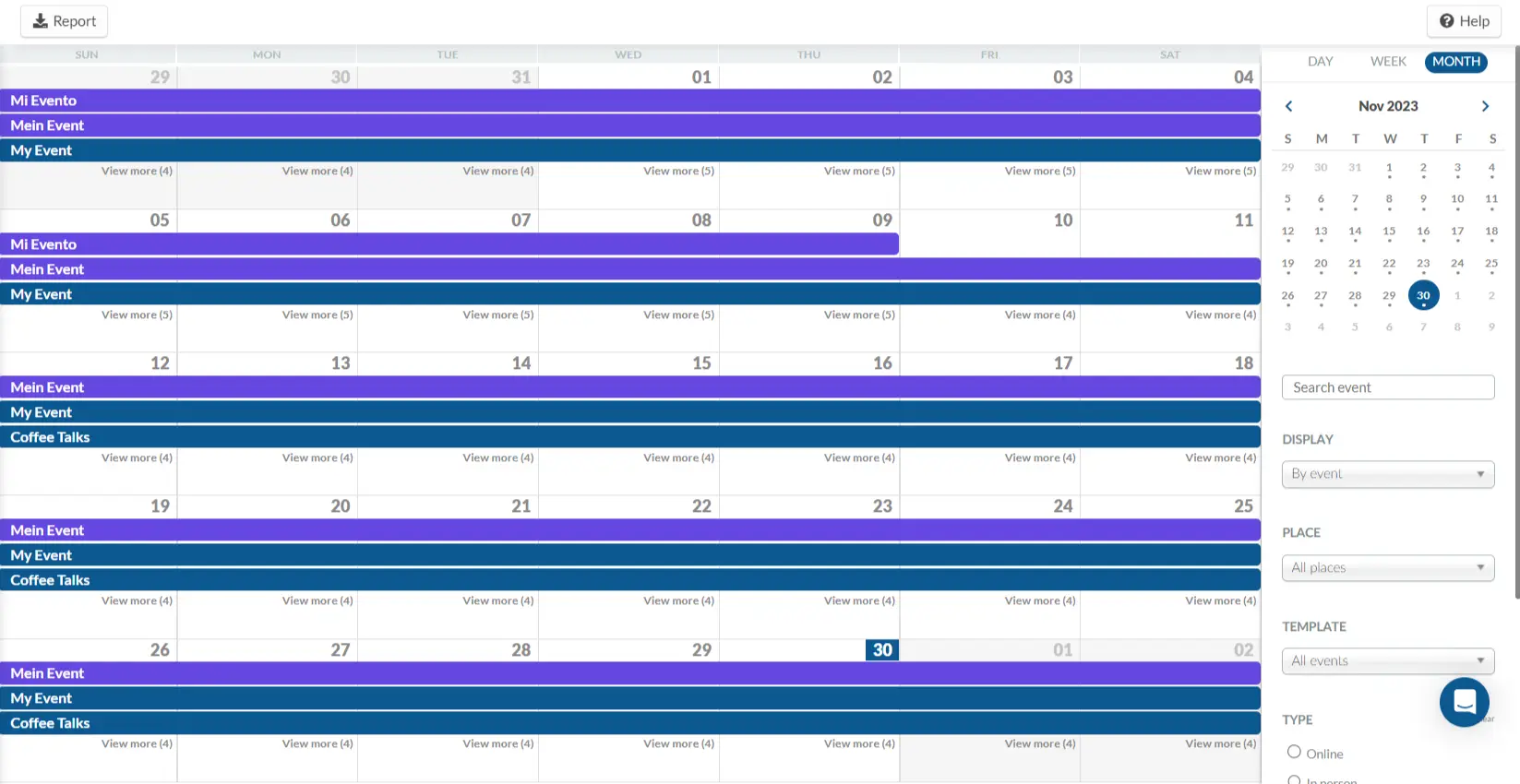
Attendee productivity depends on planner rigor. Collaboration tooling is where events usually collapse: version drift, silent agenda edits, unclear ownership, and no audit trail.
InEvent Team Sync targets these failure modes with planner-facing mechanics.
InEvent Team Sync treats planning as structured work:
Assign tasks to teammates (example: “Review speaker bio”).
Tie tasks to agenda objects (session, speaker, sponsor deliverable).
Track completion state with timestamps.
This fits executive assistants and internal comms managers because it removes ambiguous “who owns this” loops. It also fits HR because HR needs governance for training events and internal programs.
Planning teams typically need:
Comment threads on session descriptions, speaker bios, and CTA copy.
Approval gates for executive sessions.
A publish boundary that separates draft edits from attendee-visible state.
If you pair this with Smart-Cal, you get a real operational benefit:
A planner edits a session in draft mode.
Team Sync captures discussion and approvals.
A publisher promotes the change.
Smart-Cal updates the subscription feed.
Notification Hub sends “agenda changed” alerts to affected attendees.
A calendar integration fails socially before it fails technically. Users stop trusting the agenda when changes appear without attribution.
Team Sync tracks:
Editor identity
Changed fields (time, room, speaker, description)
Change timestamps
Promotion events (draft to live)
When HR asks “why did that session move,” the audit trail answers it without a meeting.
Matchmaking only works if it prevents double-booking. Attendees already live inside Google or Outlook. If a user books a sponsor meeting inside the InEvent app and their corporate calendar stays free, you create collisions and no-shows.
InEvent Smart-Cal and Team Sync solve different sides of this:
Smart-Cal publishes event agenda and scheduled meetings for attendee subscription.
Team Sync coordinates internal planning and meeting supply.
You implement scheduling convergence with two mechanisms:
Calendar subscription for event-managed meetings
InEvent writes meetings as VEVENTs with stable UIDs.
The attendee subscribes once.
Calendar clients display the meetings and time blocks on refresh.
Two-way calendar management (CalDAV-class behavior) where allowed
CalDAV supports two-direction sync and event management semantics. (Google for Developers)
Enterprises often gate two-way calendar writes behind admin consent and security policy.
When policy allows, InEvent blocks “Busy” availability on the attendee’s primary calendar directly.
If a company disallows writes into corporate calendars, Smart-Cal still prevents most collisions because the meeting appears on the attendee calendar quickly enough to function as a block on the attendee’s schedule. You then reinforce immediacy with Notification Hub DMs.
HR and comms teams often need protected blocks:
lunch
offsite time
executive prep windows
mandatory sessions
Team Sync exposes “Busy” availability logic at scheduling time so meeting proposals avoid blocked windows by design.
Users hate “join a meeting” buttons that open the wrong surface. They want:
Teams links that open Teams
Zoom links that open Zoom
Web fallback only when needed
InEvent supports external enterprise video conferencing, including Microsoft Teams and Zoom, and describes two delivery modes: embed inside the Virtual Lobby or push a deep link to desktop and mobile apps. (InEvent)
This matters for productivity because:
Exec assistants schedule sessions with confidence that the join flow works on managed devices.
Internal comms teams reduce “how do I join” tickets.
HR avoids training disruptions from link confusion.
InEvent supports native breakout room concepts inside its own experience, which covers many training and workshop formats without forcing a switch to third-party UIs. (InEvent)
When an organization standardizes on Teams meetings, Teams also supports breakout rooms in its own meeting surface. (Microsoft Support)
A practical workflow:
InEvent publishes the agenda and join links.
Smart-Cal keeps the schedule consistent.
Notification Hub posts “Join now” links into Teams or Slack.
The join link opens the correct conferencing client.
Q: Does it work with Exchange On-Premise?
Yes. InEvent supports Exchange environments through a hybrid connector pattern: users subscribe to Smart-Cal feeds as Internet calendars, while IT routes traffic and policies through hybrid Exchange controls. Exchange manages subscription updates server-side when users add calendars via OWA, which influences refresh timing. (Microsoft Learn)
Q: Can we block specific times?
Yes. InEvent Team Sync supports “Busy” availability so scheduling avoids protected windows. Smart-Cal then publishes confirmed blocks to attendee calendars, and Notification Hub reinforces changes through targeted reminders.




