



One of our sales representatives will contact you shortly.
Video is the riskiest part of any modern event. When it works, no one notices. When it fails, it’s the only thing people remember.
Unlike registration or email, video happens live. There’s no second chance. A dropped stream, frozen screen, or out-of-sync audio can undo months of planning in minutes. That’s why streaming failures hit harder than almost any other event issue.
Most of those failures come from the same place: streaming is treated as an add-on rather than as infrastructure.
When streaming is an afterthought, teams focus on the player instead of the system behind it. A Zoom link gets pasted in. A YouTube embed gets dropped on a page. No one thinks through backup streams, latency trade-offs, speaker workflows, or how attendance and engagement data will be captured. The video might play, but the experience is fragile and the data is lost.
This is where integration matters more than the player.
A good player shows video. A good integration makes the video part of the event. It connects streaming to registration, access control, engagement, analytics, and CRM data. It supports redundancy. It fits into production workflows. And it gives teams visibility into issues when they arise—not after the event is over.
Enterprise teams don’t think about video as content. They think about it as infrastructure. Just like Wi-Fi, check-in, or security, streaming has to be reliable, monitored, and connected to the rest of the stack.
That’s the approach behind InEvent. Video streaming isn’t locked to a single provider or format. It’s designed to integrate with multiple streaming options—professional broadcast tools, enterprise platforms, and large-scale public services—while keeping data, access, and engagement in one place.
When streaming is treated as infrastructure, not content, teams stop crossing their fingers and start running events with confidence.
Video streaming breaks trust faster than any other part of an event—and once that trust is gone, it’s hard to win back.
The biggest reason is single-point-of-failure setups. Many events rely on one stream, one encoder, one platform, one connection. If any link in that chain fails, the entire experience goes dark. Attendees don’t see the contingency plan. They just see a frozen screen. From their perspective, the event is broken.
Another common issue is platform lock-in. When streaming is tied to a single tool by default, teams lose flexibility. If the platform struggles under load, introduces latency, or doesn’t support the production setup on site, there’s little room to adapt. Decisions get made based on tool limitations instead of event requirements.
Then there’s the lack of backup streams. In professional broadcasting, redundancy is assumed. In events, it’s often skipped to save time or cost. No secondary encoder. No alternate ingest point. No fallback player. When something goes wrong, teams scramble instead of switching. The audience waits—and confidence erodes.
The most damaging problem, though, is poor visibility during failures.
When a stream drops, teams need answers immediately. Is the issue on the encoder? The network? The player? The streaming service? Without real-time visibility, troubleshooting turns into guesswork. By the time the problem is identified, attendees have already left or started sharing complaints.
This is why streaming failures feel different from other event issues. A delayed email is annoying. A slow check-in is frustrating. But a broken stream feels like a broken promise. People cleared their calendars. Speakers prepared. Sponsors invested. When video fails, it undermines the entire experience in a matter of seconds.
The key idea is simple: streaming issues destroy trust faster than any other failure.
That’s why experienced teams stop thinking about streaming as “the video part” and start treating it as mission-critical infrastructure. They plan for redundancy. They avoid lock-in. They demand visibility. And they choose platforms—like InEvent—that support multiple streaming integrations and production setups instead of forcing a single path.
When streaming is built for failure—not perfection—events become more resilient. And resilience is what audiences remember when something unexpected happens.
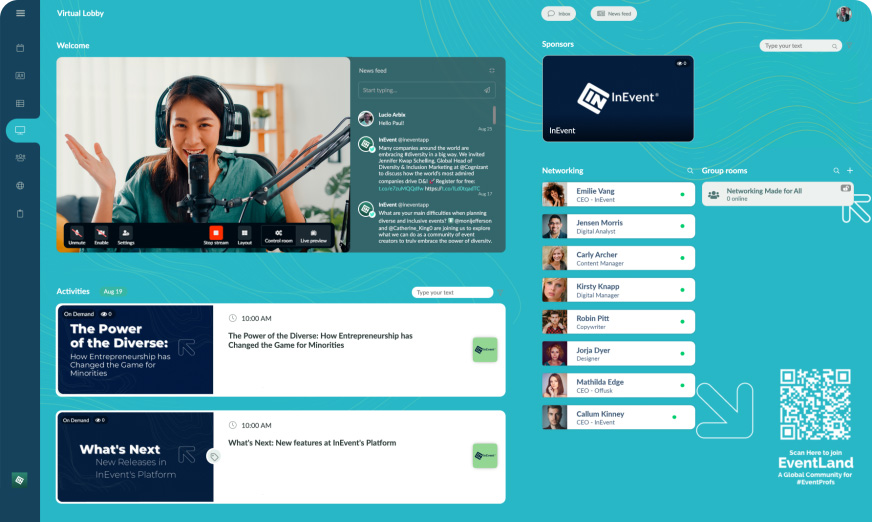
A lot of event teams say they have streaming “integrated” when what they really have is a video link placed somewhere in the experience. That distinction matters—because streaming and streaming integration are not the same thing.
Streaming is not a Zoom link.
Zoom is great for meetings and small group conversations. But past a certain scale, it becomes fragile. Attendee limits, speaker permissions, latency, and branding constraints show up fast. Dropping a Zoom link into an event page doesn’t make it integrated—it just means video happens somewhere else.
Streaming is not an embedded YouTube video.
YouTube is excellent at delivering video to massive audiences, but on its own it knows nothing about your event. It doesn’t understand who registered, who attended, or who engaged. When streaming lives outside the event system, you lose control over access, data, and experience.
And integration is not an iframe.
An iframe displays video. Integration connects systems. If the event platform can’t control access, track attendance, capture engagement, or respond when something fails, the video is simply being displayed—not integrated.
Real video streaming integration starts much earlier in the chain.
RTMP ingestion is the foundation. This is how professional video enters a platform. RTMP allows production teams to send a live feed from broadcast tools, encoders, or studios directly into the event environment. It’s what makes multi-camera setups, on-site AV, and remote speakers work together.
On top of that sits player orchestration. This is the logic that decides who sees what, when, and how. It handles authentication, session routing, playback behavior, and transitions between live and on-demand content. Without orchestration, every viewer experience is a guess.
Redundancy and failover are what keep things running when something breaks. Integrated streaming setups assume failure and plan for it. Multiple ingest points. Backup encoders. Alternate players. When one path drops, another takes over—often without the audience noticing.
Finally, there’s the data and engagement connection.
An integrated stream knows who is watching, how long they stay, and how they interact. Attendance, watch time, and engagement become part of the event’s data model instead of disappearing into a video platform silo. This is what allows video to support analytics, CRM sync, and post-event insight.
Platforms like InEvent approach streaming with this full picture in mind. Video isn’t treated as an isolated component—it’s woven into access control, engagement tracking, and event data flows.
That’s the difference between “we streamed video” and “we ran a reliable, measurable event.”
Not all event video is the same—and treating it that way is where many streaming strategies fall apart. Different moments in an event demand different levels of reliability, interaction, and production control. Understanding these use cases helps teams choose the right streaming setup instead of forcing one tool to do everything.
Keynotes are high-stakes. They often carry the largest audience, the most visibility, and the least tolerance for failure. These sessions benefit from broadcast-style streaming: professional encoders, controlled latency, and redundancy.
The priority here is stability and scale. Interaction is usually limited, but delivery must be flawless. A keynote stream should feel like a television broadcast, not a video call. This is where RTMP-based streaming and enterprise-grade delivery matter most.
Breakouts are more nuanced. Audiences are smaller, and interaction matters more. Some sessions may still require broadcast quality, while others benefit from lower latency to support Q&A or discussion.
Breakout streaming often needs flexibility—switching between speakers, sharing content, or adjusting format on the fly. The right setup balances production control with responsiveness, rather than defaulting to the same approach used for keynotes.
Webinars sit between events and meetings. They typically have a single focus, a defined audience, and clear engagement goals. Chat, polls, and Q&A are often central to the experience.
Streaming for webinars prioritizes interaction and data capture. Knowing who attended, how long they stayed, and how they engaged is often more important than cinematic production. Latency trade-offs are acceptable if they support participation.
Hybrid events are the most complex use case. They combine on-site production with remote audiences and speakers. Cameras, microphones, lighting, and networks on-site must work seamlessly with streaming infrastructure off-site.
Hybrid stages require careful coordination. Redundancy becomes critical because failures affect both physical and virtual audiences. The streaming approach must support professional AV while still integrating with the event platform’s access and engagement layers.
Replays extend the life of an event. They allow teams to reach audiences who couldn’t attend live and to continue generating value after the event ends.
On-demand streaming shifts priorities. Latency no longer matters, but accessibility, discoverability, and data consistency do. Replays should retain the same access rules and engagement tracking as live sessions, so insights don’t disappear once the stream ends.
Each of these use cases demands a different balance of scale, interaction, reliability, and data. Treating all event video the same leads to compromises—either overbuilding simple sessions or underpreparing critical ones.
Platforms like InEvent support multiple streaming approaches within a single event, allowing teams to match the technology to the moment. That flexibility is what keeps complex programs running smoothly—without forcing every session into the same fragile setup.There isn’t one “correct” way to stream an event. What matters is choosing the right integration model for the audience size, production complexity, and risk tolerance of each session. Most event programs use a mix of models—often within the same event.
Here’s how the core streaming integration models differ in practice.
Native streaming is built directly into the event platform. It’s typically the simplest setup: fewer tools, fewer handoffs, faster configuration.
The main advantage is convenience. Access control, attendance tracking, and engagement features are already connected. There’s less to wire together, which reduces setup time and points of failure.
The tradeoff is flexibility. Native streaming may not support complex production workflows, advanced camera setups, or external broadcast studios. For smaller sessions or internal events, this is often enough. For high-stakes broadcasts, it can feel limiting.
RTMP-based streaming allows teams to send live video from external tools into the event platform. This is the backbone of professional event streaming.
The benefit here is control. Production teams can use dedicated encoders, switch between cameras, manage graphics, and control audio independently. The event platform handles access, playback, and data.
The downside is complexity. RTMP setups require testing, coordination, and rehearsal. They’re powerful, but they demand experience and planning.
Embedded meeting tools—like video conferencing platforms—are commonly used for interactive sessions, workshops, or speaker-led discussions.
Their strength is familiarity. Speakers know how to use them. Interaction is built in. Setup is quick.
The limitation is scale and resilience. Meeting tools aren’t designed for large audiences or broadcast-level reliability. Analytics are often shallow, and production control is minimal. They work best when engagement matters more than polish.
Production-grade tools are used for events that resemble live television. They support multiple cameras, remote contributors, overlays, and advanced monitoring.
These tools shine when quality and reliability are non-negotiable. They also support redundancy—multiple encoders, backup feeds, and failover paths.
The cost is coordination. These setups require skilled operators, detailed run-of-show planning, and integration with the event platform to handle access and data.
Each model solves a different problem. Simplicity versus control. Speed versus resilience. Interaction versus polish.
Platforms like InEvent are designed to support multiple models simultaneously, allowing teams to choose the model that fits each session rather than forcing everything through a single tool.
That flexibility is what keeps events running smoothly—no matter how complex the program becomes.
Enterprise events rarely rely on a single streaming setup—and that’s intentional. Different sessions carry different risk, scale, and interaction requirements. The strength of InEvent is that it doesn’t force one streaming model. Instead, it supports multiple video streaming integrations so teams can match the technology to the moment.
Below is how the main streaming options work in practice, when to use them, and the problems they solve.
Vimeo is a strong choice for high-quality enterprise streaming where brand control and reliability matter. It supports polished playback, branded players, and consistent delivery for professional audiences.
When integrated with InEvent, Vimeo streams are delivered inside the event experience rather than sending attendees elsewhere. Access control, session routing, and attendance tracking remain tied to the event, while Vimeo handles video quality and scale behind the scenes.
This integration is best used for events like keynotes, executive sessions, customer-facing broadcasts where brand presentation and stability are priorities.
Problem it solves: Delivers broadcast-quality video without sacrificing control over who can watch or how engagement is tracked.
YouTube Live excels at massive scalability. It’s designed to handle very large audiences without performance degradation. Streams can be public, unlisted, or restricted—depending on how access is configured.
InEvent integrates YouTube Live via RTMP ingestion, allowing production teams to stream from professional tools while keeping the viewer experience embedded within the event. Attendees don’t need to navigate away, and event data remains centralized.
This integration is particularly used for large-scale public or semi-public events, product launches, or sessions where reach is the top priority.
Problem it solves: Handles audience spikes at scale while maintaining a single event experience.
Twitch is built for live, chat-driven engagement. It supports large audiences and real-time interaction, making it effective for energetic, community-style events.
When used with InEvent, Twitch streams can be embedded into the event flow, allowing teams to combine high-energy chat interaction with structured access and event context.
This integration is used for events like developer conferences, community events, or sessions where audience participation and chat activity are central.
Problem it solves: Creates a dynamic, interactive environment for large audiences without custom development.
Zoom remains a familiar tool for smaller, speaker-led sessions. It’s widely understood, quick to set up, and effective for workshops, panels, or discussions where interaction matters more than broadcast polish.
Integrated with InEvent, Zoom sessions can be routed through the event schedule and tied to registration and attendance logic instead of living as standalone links.
This integration is used for events like team breakouts, workshops, and interactive sessions with limited audiences.
Problem it solves: Keeps speaker workflows simple while maintaining event-level structure and data capture.
Microsoft Teams is commonly used for internal and corporate events, especially in organizations already aligned with Microsoft’s ecosystem.
InEvent integrates Teams to support enterprise security, authentication, and internal access requirements—while still providing event-level orchestration and analytics.
Best used for town halls, internal conferences, and corporate communications events.
Problem it solves: Aligns streaming with enterprise security and identity standards without fragmenting the event experience.
RTMP custom streaming is the most flexible option. It supports professional AV setups, on-site production crews, broadcast studios, and redundant encoders.
InEvent accepts RTMP feeds from external encoders, allowing teams to build fully redundant streaming paths and switch sources if needed.
This integration is used for high-stakes events where failure is not an option.
Problem it solves: Enables broadcast-level resilience while keeping access, data, and engagement centralized.
By supporting multiple streaming integrations, InEvent allows teams to design resilient, scalable events without compromising reliability or data, no matter how complex the program becomes.
Live streaming is always a balancing act. Every decision affects latency, interaction, and reliability—and you can’t maximize all three at once. Understanding these tradeoffs is what separates stable events from fragile ones.
Latency is the delay between what happens on stage and what viewers see. Lower latency feels more immediate, but it’s harder to stabilize at scale. Higher latency introduces a slight delay, but it improves buffering, playback consistency, and reach.
For large broadcasts, a few seconds of delay is often worth it. Viewers get a smoother experience, and the stream is less likely to freeze or drop. For interactive sessions, lower latency matters more because participants expect near real-time conversation.
The mistake is assuming lower latency is always better. In reality, predictable latency beats minimal latency for most enterprise events.
Not every session needs the same balance. Keynotes prioritize viewing quality and reliability. Workshops prioritize interaction. Trying to force both into a single setup usually weakens the experience.
This is why strong event programs vary their streaming approach by session. Broadcast-style streams deliver consistency. Meeting-style streams support dialogue. Integration ensures both still feel like part of one event.
Reliability doesn’t come from hope. It comes from redundancy.
Effective redundancy strategies include backup encoders, alternate ingest endpoints, and secondary players that can be activated quickly. In higher-risk scenarios, teams prepare parallel streams that can be switched without attendee disruption.
Redundancy isn’t about expecting failure—it’s about assuming it’s possible and planning accordingly.
When something goes wrong, speed matters. Monitoring tools give teams visibility into stream health, viewer counts, and delivery issues in real time.
Without monitoring, teams rely on attendee complaints to spot problems—which is always too late. With visibility, issues can be identified and addressed before most viewers notice.
When latency, reliability, and monitoring are handled deliberately, live streaming stops being a gamble. It becomes a controlled, repeatable part of event delivery.
Once teams understand latency and reliability, the next challenge is context. Streaming rarely exists in isolation anymore. Most programs now span virtual, hybrid, and in-person formats, sometimes all within the same agenda. This is where complexity increases quickly.
Hybrid events are especially demanding because they combine two realities simultaneously.
In a hybrid setup, the event must serve both in-room attendees and remote viewers—without favoring one over the other. On-site attendees expect immediacy. Remote viewers expect clarity and consistency. The streaming layer has to bridge that gap.
Hybrid complexity often shows up in small ways: audio that works in the room but not on the stream, slides that are visible on-site but unreadable remotely, or camera angles that ignore virtual viewers entirely. These issues aren’t technical failures—they’re coordination failures.
Remote speakers add another layer. Their internet quality, audio setup, and environment are outside the production team’s control. Without integration, their feeds feel disconnected from the main event.
Integrated streaming enables remote speakers to be integrated into the same production workflow as on-site presenters. Their video and audio can be managed, monitored, and balanced rather than treated as separate calls patched into the stream.
On-site production is designed for the room. Cameras, lighting, and sound are often prioritized for the live audience. Remote viewers, however, rely entirely on the stream to understand what’s happening.
This is why professional setups treat the stream as its own audience. Camera switching, graphics, and transitions are planned with remote viewers in mind—not added as an afterthought.
The final challenge is synchronization. Slides, video, audio, and interaction need to stay aligned across formats. Even small delays can cause confusion—questions asked before slides appear, reactions that don’t match what viewers are seeing.
Strong streaming integration helps manage these differences by centralizing control and timing instead of juggling disconnected tools.
When streaming is planned across formats—not adapted after the fact—hybrid events stop feeling stitched together and start feeling intentional.
Once streaming is reliable across formats, the next question becomes more strategic: what does the business learn from it? This is where streaming stops being just delivery and starts becoming a data source.
The first layer is attendance tracking.
Integrated streaming knows who is allowed to watch and who actually does. That distinction matters. Registration shows intent. Attendance confirms action. When streaming is part of the event system, attendance is captured automatically instead of inferred from third-party video reports. BI teams don’t have to reconcile mismatched numbers or guess who actually showed up.
Next comes watch time.
Watch time adds depth to attendance. Someone who joins for two minutes is very different from someone who stays for forty-five. Integrated streaming captures this behavior at the session level, allowing teams to understand not just reach, but attention. Over time, watch-time patterns reveal which formats, speakers, and topics consistently hold interest.
Session engagement adds context on top of that.
Engagement includes interactions like polls, questions, reactions, and session switches. These signals help separate passive viewers from active participants. When engagement is tied directly to streaming sessions, teams can analyze how content performs beyond surface-level views.
This is where streaming data starts to matter outside the event team.
When attendance, watch time, and engagement are connected to identities, they can flow into CRM systems as structured activity. Sales sees which accounts watched which sessions. Marketing understands which topics drive deeper involvement. RevOps can model how engagement correlates with pipeline movement.
From there, the bridge to analytics and BI becomes possible.
Streaming data on its own answers “what happened.” Joined with CRM and revenue data, it answers “did it matter?” BI tools can combine event streaming behavior with sales activity, regional performance, and long-term trends. Over time, patterns emerge that no single event dashboard could surface.
This is why integrated streaming matters so much. Video platforms alone provide usage stats. Event platforms capture context. BI systems create insight. When those layers work together, streaming stops being an operational risk and starts becoming a strategic input.
Platforms like InEvent are designed to support this full flow—from stream to engagement to analytics—so video activity doesn’t disappear once the broadcast ends.
That’s when streaming stops being something you survive and starts becoming something you learn from.
As streaming becomes central to events, security and privacy stop being optional. For enterprise teams, the stream isn’t just video—it’s access to people, information, and often sensitive conversations.
Access control is the first requirement. Not every stream should be open to everyone. Enterprise events need clear rules around who can view which sessions, when access opens, and when it closes. Streaming that bypasses event-level permissions creates gaps that are hard to explain later.
That leads directly to authentication. Secure streaming relies on knowing who is watching, not just how many. Authentication ties viewers to identities, enabling accurate attendance tracking and preventing unauthorized access. Without it, teams can’t confidently report who attended—or protect who shouldn’t have.
Private vs public streams introduce another layer of decision-making. Public streams prioritize reach. Private streams prioritize control. Enterprise events often need both—public-facing keynotes paired with restricted internal or customer-only sessions. The streaming setup has to support that mix without forcing separate tools or fragmented experiences.
Then there are compliance considerations. Event streams may include personal data, internal strategy, or regulated information. Enterprises expect controls around data handling, retention, and visibility. Streaming can’t live outside the organization’s governance model or it becomes a risk.
This is why streaming decisions increasingly involve IT, security, and compliance teams—not just event production. Platforms like InEvent are designed to align streaming with enterprise access and security expectations, so video delivery doesn’t create blind spots.
When streaming meets enterprise requirements, teams don’t have to choose between reach and responsibility. They can have both.

Most streaming failures aren’t caused by bad technology. They’re caused by assumptions.
Single-stream dependency is the most common mistake. One encoder. One ingest point. One player. When that single path fails, the entire event goes dark. Redundancy isn’t overengineering—it’s basic risk management.
Closely related is no backup plan. Even teams that acknowledge risk often stop short of preparing alternates. No secondary stream. No fallback player. No clear switch procedure. When something breaks, improvisation replaces execution.
Another mistake is treating streaming as “IT’s problem.” Streaming sits at the intersection of production, platform, and infrastructure. When ownership is unclear, gaps appear. AV assumes the platform will handle it. The platform assumes AV has redundancy covered. The audience pays the price.
Finally, there’s no rehearsal with integrations. Teams test cameras and audio but skip end-to-end testing. Authentication isn’t validated. Engagement features aren’t exercised. Backup streams aren’t switched live. The first real test becomes the live event.
Experienced teams know better. They rehearse failures, not just success. They test integrations under pressure, not in isolation.
Streaming doesn’t fail because teams lack tools. It fails when teams underestimate complexity. Fix that, and reliability follows.
Choosing a video streaming integration isn’t about picking the most popular tool. It’s about matching the streaming setup to the real demands of your event. This checklist helps teams make that decision deliberately instead of reactively.
Audience size
Start with scale. A 50-person workshop and a 10,000-person keynote should not use the same streaming approach. Larger audiences need platforms designed for delivery at scale, while smaller sessions can prioritize interaction and flexibility.
Production complexity
Next, consider how the event is produced. Multiple cameras, on-site AV, remote speakers, graphics, and overlays all add complexity. The more production-heavy the event, the more control you’ll need over ingestion, switching, and monitoring.
Security needs
Not every stream should be public. Internal meetings, customer briefings, or regulated industries require strong access control and authentication. Streaming integrations must align with enterprise security expectations, not work around them.
Data and CRM requirements
Streaming doesn’t end when the video stops. Attendance, watch time, and engagement need to connect to CRM and analytics systems if the event is meant to drive outcomes. If streaming data lives in isolation, reporting and follow-up will always be limited.
Backup options
Finally, ask what happens when something fails. Are there alternate ingest points? Backup encoders? Secondary players? A streaming integration without redundancy is a risk—especially for high-visibility events.
The right choice isn’t the most advanced setup. It’s the one that fits your event’s risk profile, goals, and infrastructure.
For enterprise events, video isn’t a nice-to-have. It’s mission-critical.
When streaming fails, everything else fades into the background. That’s why improvisation isn’t a strategy. Integration is. Reliable streaming comes from systems designed to work together, production tools, event platforms, access control, and data layers, all aligned from the start.
This is where InEvent stands out. Streaming is treated as infrastructure, not an add-on. Multiple integration options support a range of use cases, from broadcast-scale keynotes to secure internal events. Data stays connected. Access stays controlled. And teams gain the visibility they need when things don’t go exactly as planned.
When streaming is built this way, teams stop hoping nothing goes wrong and start knowing they’re prepared.
Book a demo
See how InEvent integrates enterprise-grade video streaming without risking your event.




