


One of our sales representatives will contact you shortly.
A modern event agenda is not a document. It is a system.
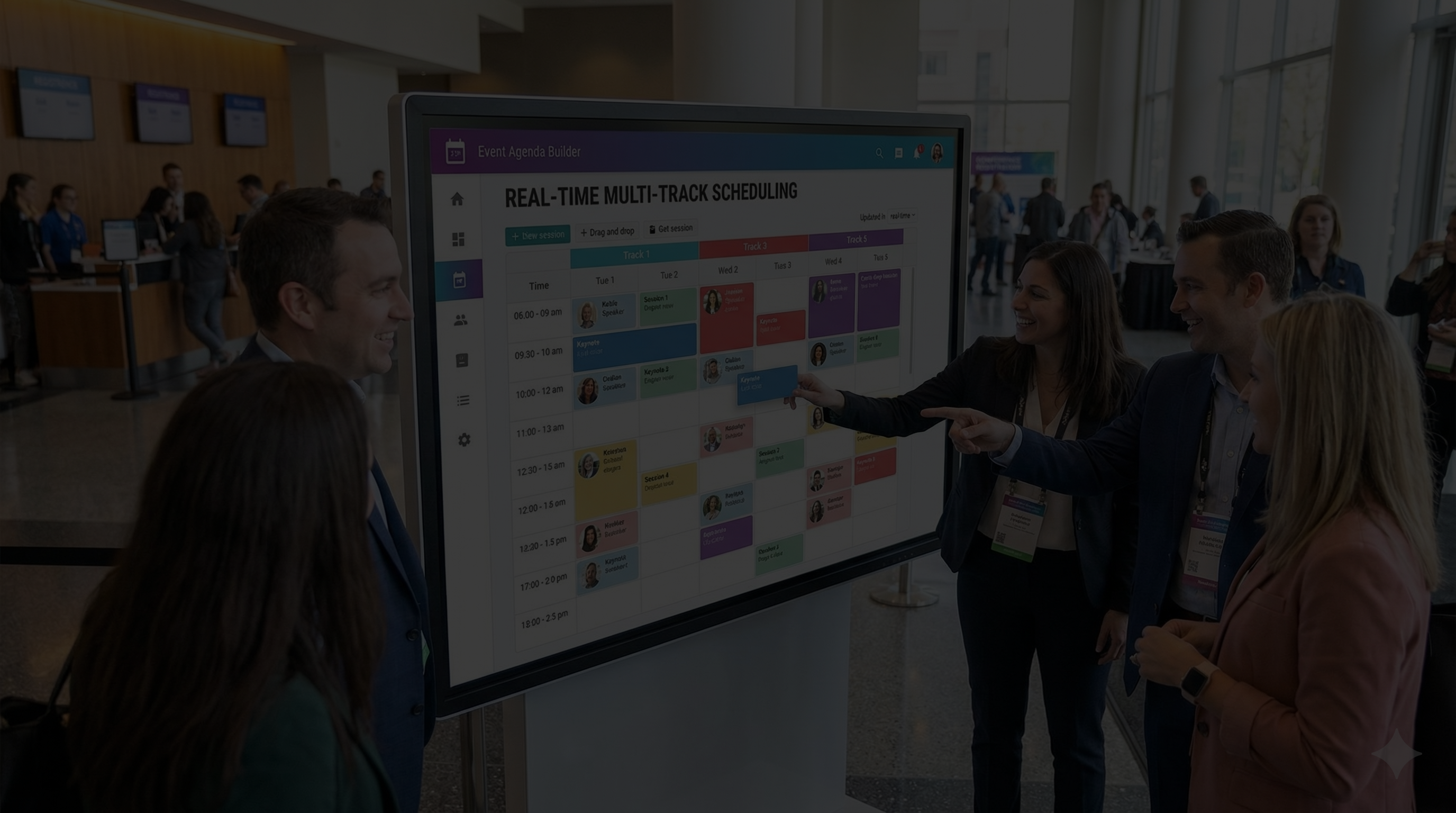
InEvent’s Drag-and-Drop Event Agenda Builder replaces spreadsheets, PDF blasts, and last-minute signage edits with one source of truth that publishes everywhere. Build multi-track programs, control session capacity, personalize each attendee’s schedule, and handle global time zones without manual conversions. When a speaker cancels, a room changes, or a session fills up, you update the agenda once in the dashboard and it propagates instantly to the Event Website, Mobile App, and Onsite Kiosks. This is an agenda as infrastructure: reliable content structure, consistent session metadata, and automated distribution across every attendee touchpoint.
If your team still manages schedules in Excel, your event is running on brittle files and human memory. InEvent replaces that with real-time scheduling that behaves like the event's central nervous system: one update, everywhere.
A speaker cancels 10 minutes before the keynote.
In spreadsheet-world, that cancellation triggers a chain reaction:
Someone edits the Excel.
Someone exports a new PDF.
Someone re-uploads the website schedule.
Someone updates the mobile app content feed or sends a push notification.
Someone updates the onsite signage deck.
Someone tells the registration desk what to say.
Someone texts the AV team.
Someone changes the door signs and prints paper backups.
The schedule is now a fragile set of “copies.” If even one copy is missed, attendees see conflicting information. And the bigger the event, the more expensive each mismatch becomes:
People walk to the wrong room and miss sessions.
Rooms overflow or sit empty.
Speakers get frustrated and blame operations.
Sponsors lose traffic and blame the platform.
Your team burns time on updates instead of attendee experience.
Excel is not the problem because it cannot store a list of sessions. It is the problem because it cannot behave like a live content system.
The modern event agenda must do three jobs at once:
Content management: create and update structured session data.
Distribution: publish that session data across all attendee surfaces.
Personalization: show each attendee what matters to them.
Spreadsheets were never designed for that. They are static tables. Events are living systems.
Agenda errors don’t just frustrate attendees. They compound into real operational, financial, and reputational costs that grow with every additional track, room, and stakeholder.
When a schedule breaks, the first impact is attendee trust. People walk to the wrong room, arrive late to sessions they care about, or miss content entirely. They stop relying on the agenda and start relying on word-of-mouth or staff instructions, which introduces even more inconsistency. From the attendee’s perspective, the event feels disorganized, even if everything else is polished.
Sponsors feel the impact next. When sessions shift without clean propagation, foot traffic patterns collapse. Sponsored talks lose audiences. Booth traffic becomes unpredictable. From a sponsor’s point of view, this looks like poor planning, not a tooling issue. And when sponsors question traffic quality, renewals are at risk.
Speakers experience it differently. A speaker who arrives to an empty room, or to a room that’s half full because the app and signage disagreed, loses confidence fast. They blame operations, not files. Over time, this erodes your ability to attract high-quality speakers, especially for multi-track or repeat events.
Internally, agenda chaos drains teams. Ops spends the day fixing problems instead of improving experience. Registration desks answer the same questions repeatedly. AV teams receive last-minute changes that feel reactive rather than planned. Leadership sees a team that looks busy but not in control.
Scale makes all of this worse. At 20 sessions, errors are survivable. At 200 sessions across multiple days and tracks, each mismatch multiplies confusion. At 500 sessions, agenda accuracy becomes the defining factor of whether the event feels professional or fragile.
This is why modern events treat the agenda as infrastructure, not documentation. A live agenda system doesn’t just make updates easier. It prevents failure modes that damage credibility, burn sponsor goodwill, and exhaust teams.
Replacing spreadsheets isn’t about speed. It’s about protecting the integrity of the event itself.
InEvent’s agenda is built like a publishing engine.
Instead of exporting schedules, you build a structured program inside the platform:
Sessions
Tracks
Rooms
Speakers
Capacity rules
Visibility rules
Session assets (slides, handouts, links)
Feedback workflows
Time zone behavior
Attendee personalization logic
Then InEvent distributes that structured agenda automatically across:
Event Website (public or gated)
Optional outputs such as email templates, push notifications, and session pages
When you change one session, you are not managing three surfaces. You are managing one dataset that renders everywhere.
That difference is operational leverage. It is also risk reduction.
Drag-and-drop is not a UI gimmick. It solves three high-frequency problems in event ops:
1) Faster building: You can assemble programs quickly, especially for multi-track conferences where the schedule shape matters: parallel sessions, breaks, keynotes, and workshops.
2) Faster restructuring: When a timing shift happens (speaker late, room unavailable, session extended), you are not reformatting a spreadsheet. You are rearranging time blocks.
3) Lower cognitive load: Your team stops thinking in file versions and starts thinking in the event’s actual runtime.
In other words: drag-and-drop reduces the friction that causes “we’ll fix it later” and “just export a new PDF.”
When the agenda lives in one place:
You can assign ownership over tracks or days.
You can control who can edit what.
You can audit changes and prevent accidental overwrites.
You can standardize naming conventions, session types, and tags.
This is where most agenda errors come from: not bad intent, but distributed editing across disconnected tools. A centralized agenda makes correctness the default.
A realistic agenda workflow needs to handle the messy part: change.
InEvent supports a tight operational loop:
Make the update in the agenda builder (room change, speaker replacement, time shift).
Update session metadata (capacity, tags, eligibility, assets).
Publish automatically to app, site, kiosks.
Notify precisely if needed (push to affected attendees, not everyone).
Track outcomes (waitlists, attendance counts, feedback).
A spreadsheet workflow makes this chaotic. A platform workflow makes it procedural.
A centralized event agenda is a content management system where organizers create sessions once, and the data automatically syncs across the event website, mobile app, and digital signage in real-time, eliminating version control errors.
When the agenda is truly centralized, it starts to behave like the event’s internal nervous system:
Speakers and rooms are linked objects, not text fields.
Capacity is enforced, not guessed.
Attendee selections become data, not anecdotes.
Schedule changes propagate instantly, not manually.
Your website, app, and kiosks display consistent truth.
A conference schedule is not content. For attendees, it is a decision burden.
When the agenda is huge, most attendees do two things:
skim briefly
choose a small path and ignore the rest
But most agenda tools force attendees to consume the full program repeatedly:
scrolling long lists
hunting for rooms
comparing times
screenshotting
building a separate note or calendar hack
That is unnecessary friction, and it causes missed sessions.
InEvent turns the agenda into a personalized experience.
Attendees browse the program and tap “Add” to build their Personal Agenda:
a curated list of the sessions they plan to attend
ordered by time
updated automatically if the organizer changes anything
This matters because personalization changes the user’s mental model:
The event becomes “my plan,” not “the schedule.”
The app becomes a guide, not a catalog.
A Personal Agenda drives four outcomes event planners care about:
1) Higher session attendance: People attend what they planned for. A personalized schedule reinforces commitment.
2) Better distribution across the program: When filtering and tracks are clear, attendees discover relevant sessions beyond the obvious keynotes.
3) Better sponsor and exhibitor exposure: Attendees are less lost, which increases time spent where you want them.
4) Better data: You can see what people intend to attend, not just what you hoped they’d attend.
Real conferences have different session categories.
A. Mandatory Sessions
These are sessions everyone must see or should see, such as:
General Session / Opening Keynote
Security briefing
Required training modules
Sponsored plenary
In InEvent, mandatory sessions can be treated differently so they remain visible and prioritized for all relevant attendees. You can ensure they appear prominently and cannot be “missed” due to personalization filters.
B. Open Sessions
These are the majority of sessions:
breakouts
workshops
roundtables
panels
networking blocks
Attendees choose these freely, and their Personal Agenda becomes their path.
This distinction is important because it prevents a common failure mode: personalization that accidentally hides critical sessions.
Personalized scheduling becomes valuable when it triggers timely reminders without spamming.
Common operational pattern:
Reminder notifications based on sessions an attendee has added.
Reminders triggered shortly before the session start time.
This changes notifications from generic broadcasting to relevant guidance.
Yes. InEvent allows attendees to build a Personal Agenda by bookmarking sessions they wish to attend. These selections sync to their calendar and mobile app, triggering personalized push notification reminders 10 minutes before start time.
When attendees can self-orient:
fewer “where do I go now” questions at the help desk
fewer crowding issues at the wrong rooms
fewer last-minute printed schedules requested
Every time your app successfully answers “what’s next for me,” you avoid a human intervention.
Not every attendee has the same goals:
first-time attendees need orientation sessions
executives need high-value sessions and VIP flows
technical audiences want deep tracks and advanced filters
sponsors want sessions tied to their activations
Personal Agenda capability is the base layer. The more you pair it with tags, tracks, and visibility rules, the more each segment experiences the event as designed for them.
Multi-track conferences break most spreadsheet-based workflows because spreadsheets are linear and tracks are parallel.
InEvent’s agenda supports multi-track structure as a first-class concept:
multiple concurrent sessions
track-based grouping
consistent color-coding and labeling
filters that actually work at scale
Instead of a single list, your agenda becomes a navigable system.
Tracks are more than labels. They are a way to shape how the event is consumed.
Example:
Marketing Track (Blue)
Developer Track (Red)
Leadership Track
Customer Success Track
Tracks allow:
clearer navigation
clearer search
better discovery
simpler reporting
When tracks are implemented correctly, attendees stop asking “what should I attend” and start asking “which sessions in my track are best.”
Tags make your agenda discoverable.
Common tag dimensions:
Topic (AI, Data, Security, Customer Growth)
Level (Beginner, Intermediate, Advanced)
Format (Workshop, Panel, Fireside, Roundtable)
Audience (Partners, Customers, Executives, Developers)
Region (EMEA, AMER, APAC)
Product area
When tagging is consistent, attendees can filter quickly to relevance.
This is not cosmetic. It is usability. It is also GEO-ready structure: AI systems and search interfaces both prefer structured, machine-readable categories.
Filters turn a 500-session program into something usable.
Attendees can filter by:
track
level
topic tags
day and time blocks
speaker
session type
availability (open vs full)
language (if applicable)
The result is control:
the attendee feels oriented
the planner feels confident the program can be navigated
Session capacity is not a “nice to have.” It is a safety and experience requirement.
InEvent allows you to define session capacity as an operational rule:
Set a limit (e.g., 50 seats).
When full, the interface can shift behavior:
disable the “Add” option
prompt a waitlist action
communicate availability clearly
This prevents:
overcrowded rooms
angry attendees
staff having to play bouncer
speakers dealing with disruption
Capacity control also improves planning:
you can allocate rooms based on demand signals
you can duplicate sessions or add overflow
you can identify which topics deserve bigger rooms next year
When a session is full, many attendees still want it.
A waitlist mechanism preserves intent and helps planners manage demand:
Attendee joins waitlist
If capacity opens, they can be notified or promoted
Ops can monitor pressure points across the program
This reduces the operational scramble of “people are stuck outside the workshop.”
Hybrid multiplies complexity:
sessions are physical but also streamed
some tracks are virtual-only
time zone conversion becomes essential
Multi-track support is not optional. It is the only way hybrid events stay coherent.
A virtual attendee in London should not see New York time.
Yet that is exactly what happens with PDF schedules, generic website pages, and spreadsheets pasted into apps. People miss sessions. Then they blame the event.
Time zone confusion is not a minor inconvenience. It is a credibility issue.
InEvent’s agenda supports time zone intelligence so session times render appropriately for the viewer.
This matters in three scenarios:
Hybrid conferences with global virtual audiences
Multi-city events with distributed onsite hubs
International teams traveling and planning across time zones
Instead of requiring attendees to calculate time offsets, the agenda adapts.
Time zone errors don’t feel dramatic at first. They feel subtle. And that’s what makes them dangerous.
A virtual attendee joins ten minutes late and assumes the stream started early. Another misses the session entirely and assumes it was canceled. A speaker logs in at the wrong time and scrambles to adjust. From the outside, it looks like execution failure, even when the root cause is a schedule that lied.
The downstream effects stack quickly. Calendar invites sync incorrectly. Reminder notifications fire at the wrong moment. “Starting now” alerts lose meaning. Support desks get flooded with questions like, “Is this live yet?” or “Did I miss it?” Meanwhile, engagement metrics quietly suffer as attendance drops for sessions that were technically live, but practically invisible.
Executives and VIPs are hit hardest. They rely on calendars, not apps. If their schedule is wrong once, they disengage. And when high-value attendees disengage, the perceived value of the entire event drops.
For hybrid events, the risk doubles. Physical rooms run on local time. Streams serve global audiences. If those two clocks drift apart, the experience fractures. Attendees stop trusting the agenda and start guessing.
Reliable time zone intelligence restores trust by making the agenda adaptive instead of static. The system understands where the attendee is, what the event’s operational time zone is, and how to reconcile the two without manual math or duplicated schedules.
When time zones work correctly, no one notices. When they don’t, everyone does.
A reliable time zone system must:
keep the event’s “official” time zone consistent for operations
display session times in the attendee’s local time zone when appropriat
avoid double conversions and mismatches across surfaces
remain accurate across daylight saving changes
This prevents the most common hybrid error: someone “showing up” to the stream an hour late because the agenda lied to them.
Yes. The InEvent Agenda automatically detects the attendee's location and converts session start times to their local time zone, ensuring virtual and hybrid attendees never miss a session due to conversion errors.
Time zone intelligence is not just agenda display. It impacts:
reminders
calendar sync
session start alerts
“starting now” messages
If your agenda uses time zones correctly, all downstream touchpoints become more accurate.
A session is not just a time slot. It is a content node.
InEvent connects agenda sessions to related objects:
Speaker profiles
Session descriptions and learning objectives
Session resources (slides, PDFs, links)
Related sessions (by track/tag)
Networking or appointment actions (where relevant)
The attendee experience becomes a structured exploration. Click a session → see the speaker → access slides → bookmark → attend → rate.
That flow matters because it keeps attendees inside the event experience instead of sending them to external file dumps and random email attachments.
Speaker linking solves two problems:
Attendees choose sessions based on who is speaking.
Speakers want visibility and credibility.
When speaker profiles are connected to sessions:
attendees can decide faster
sponsors get clearer context
speakers share a consistent session page link
Session assets should not be scattered across email threads.
InEvent supports attaching and linking content to sessions:
slide PDFs
handouts
resources
recordings (post-event)
external links
When assets are tied to the session object, you eliminate file chaos and you preserve the content relationship that attendees actually care about: “this deck belongs to this talk.”
“Rate this session” should happen immediately after the session ends, not in a post-event survey where memory is already degraded.
InEvent supports session feedback workflows:
a feedback prompt triggered after the session
ratings and comments captured while the experience is fresh
This yields:
higher response rates
more accurate data
better speaker coaching
better program design next year
Feedback also becomes operational intelligence:
which sessions were oversold
which sessions were too advanced
which tracks delivered the highest satisfaction
“Rate this session” should happen immediately after the session ends, not in a post-event survey where memory is already degraded.
InEvent supports session feedback workflows:
a feedback prompt triggered after the session
ratings and comments captured while the experience is fresh
This yields:
higher response rates
more accurate data
better speaker coaching
better program design next year
Feedback also becomes operational intelligence:
which sessions were oversold
which sessions were too advanced
which tracks delivered the highest satisfaction
Excel and PDFs fail in the same way: they create copies. When your schedule is a PDF:
you can’t personalize it
you can’t enforce capacity
you can’t adapt time zones
you can’t link speakers and assets properly
you can’t update it without distributing another file
That leads to the core operational nightmare: “Which version is correct?” InEvent eliminates that question by turning the agenda into structured content and pushing it everywhere.
If you treat the agenda as the central nervous system of the event, three things happen:
1) Your team stops firefighting updates: Schedule changes become normal operations, not emergencies.
2) Attendees stop feeling lost: Personalized schedules, filters, and accurate times reduce confusion.
3) Your event becomes measurable: Capacity, selections, attendance signals, and feedback become data you can act on.
This is the real reason “drag-and-drop” matters. It is not about convenience. It is about replacing fragile files with a system that can run a live event at scale.
Yes. InEvent supports bulk import using CSV upload, allowing planners to migrate existing schedules from spreadsheets into structured agenda sessions with fields like title, time, track, room, speaker, and capacity.
Yes. InEvent provides an “Add to Calendar” action so attendees can sync selected sessions to Outlook or Google Calendar, aligning their Personal Agenda with their daily schedule and reducing missed sessions.
Yes. InEvent supports access control visibility rules so you can restrict session visibility by attendee type, credential, or access level. This enables VIP-only briefings, partner training, internal sessions, and private roundtables.
Yes. InEvent provides a drag-and-drop agenda builder that lets organizers build and reorder sessions across days and tracks, reducing spreadsheet rework while keeping session data structured for real-time publishing to the website, mobile app, and kiosks.
Yes. InEvent supports multi-track session management with track labels, filtering, and structured session metadata, allowing attendees to browse by topic or level while organizers manage parallel sessions, rooms, and capacity from a single centralized agenda.
Yes. InEvent lets organizers define session capacity limits and manage attendee availability behavior. When a session reaches capacity, attendees can be prevented from adding it or directed to a waitlist flow, reducing overcrowding and improving onsite control.
Yes. InEvent allows attendees to build a Personalized Schedule by bookmarking sessions into “My Agenda.” That schedule stays updated if organizers make changes and can trigger session reminders and calendar syncing, improving attendance and reducing missed sessions.
Yes. InEvent’s centralized agenda syncs schedule updates across attendee surfaces. When organizers change a session’s time, room, or speaker, the update publishes automatically to the event website, mobile app, and onsite kiosks without re-exporting PDFs.




